How a Recruiting CRM Manages Clients, Candidates and Pipeline in One Place
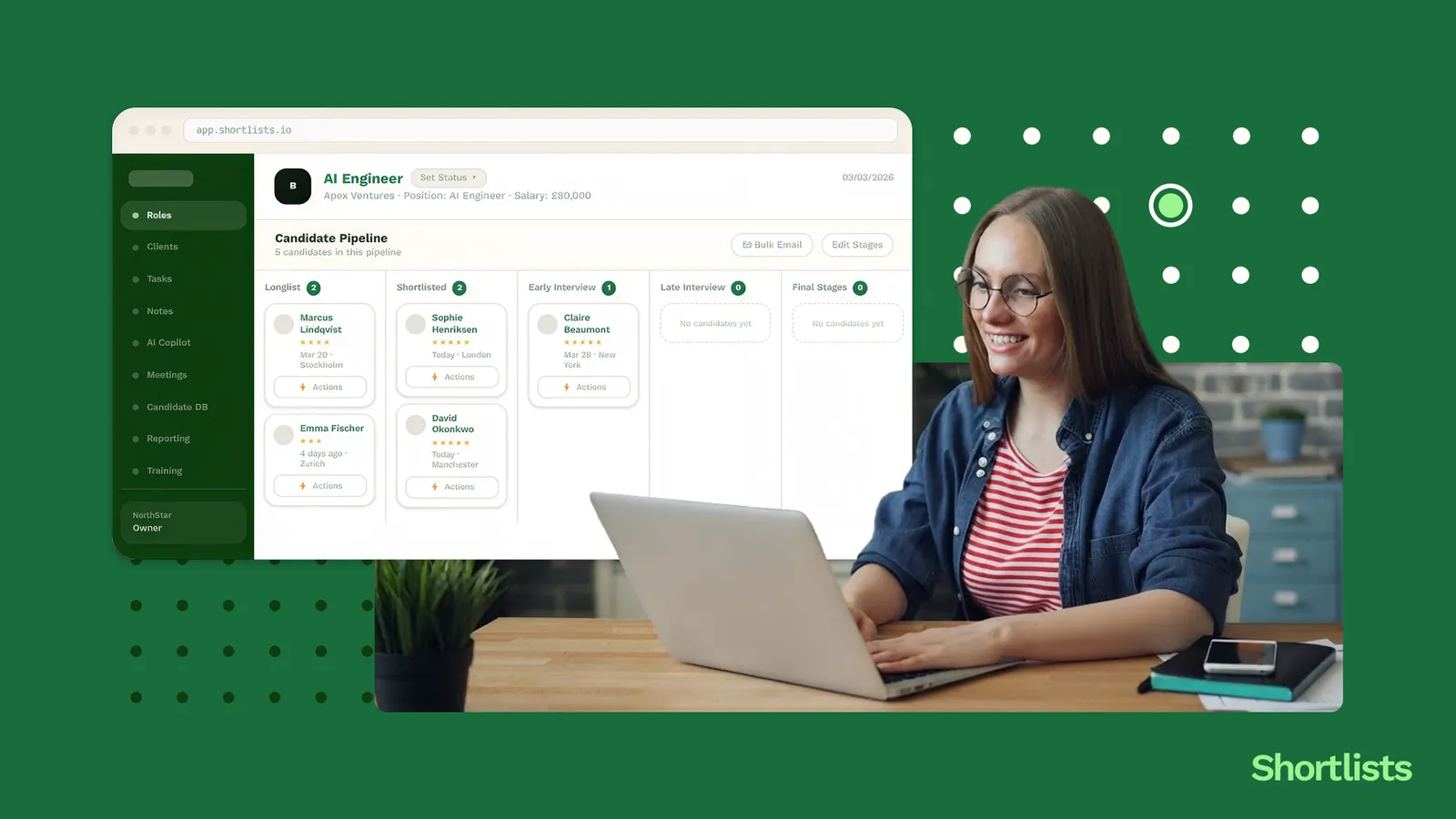
A recruiting CRM connects your three core pipelines — clients, candidates, and live jobs — through a single data model. A client brief creates a job; the job links to matched candidates; candidate progress updates the job stage automatically. No record lives in two places, so the pipeline stays current without manual entry, and a great candidate stops slipping through the cracks.
Picture a normal Thursday. You've got eight live briefs, around sixty active candidates, and a dozen follow-ups due this week. Now the honest question: how many of those are written down somewhere reliable, and how many are in your head?
For most small agencies the answer is "more in the head than I'd like to admit." That works at two desks. It breaks at three. The breakage isn't dramatic — it's a candidate who was perfect for the role that landed on Wednesday but didn't get surfaced because their record was a tab away and out of date, or a client brief that quietly went cold because nobody owned the follow-up. The fee still gets billed. It just gets billed by someone else.
The fix isn't more discipline or a better-colour-coded spreadsheet. It's a change in how the three pipelines relate to each other. This is what a recruiting CRM is designed to solve. This piece covers why clients, candidates, and jobs have to be connected, what the three-pipeline view actually looks like, what "one place" really means, and the features that make it work — so you can stop being the connective tissue between three lists.
Why clients, candidates and jobs need to be connected
Three nodes, and the edges between them
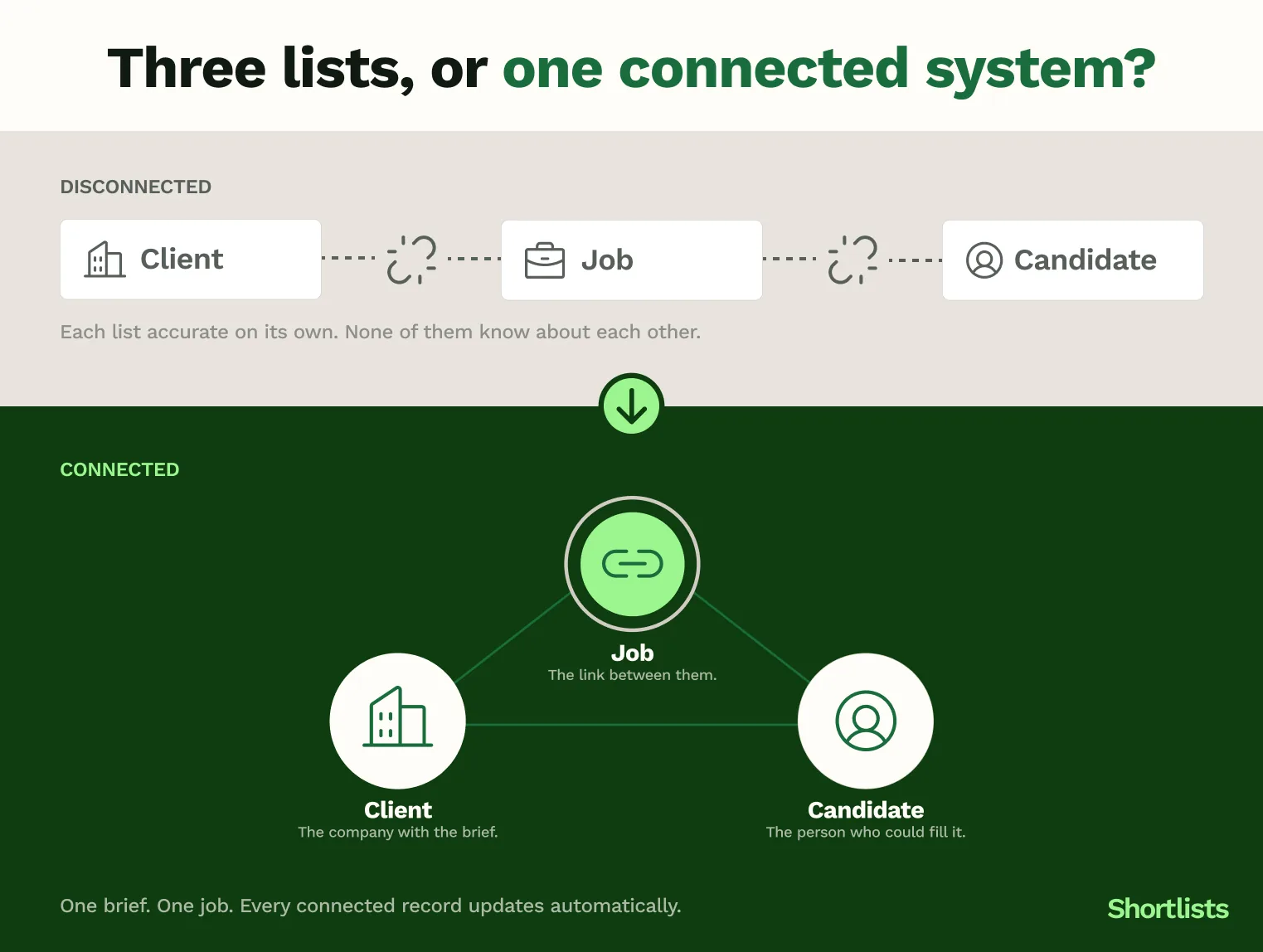
A recruitment agency runs on three things: clients who have roles, candidates who fill them, and the jobs that join the two. The instinct is to manage them as three lists — a client spreadsheet, a candidate spreadsheet, a jobs tab. But the value isn't in the lists. It's in the edges between them. A client brief becomes a job. A job connects to candidates. A placement closes the client relationship and starts the next one. Manage the nodes without the edges and you've built three filing cabinets that don't know about each other.
What happens when the pipelines don't talk
When the three live separately, a person has to keep them in step, and that person is you. Candidate status sits in one sheet, the client brief in another, the job stage in a third, and none of them update each other. So a candidate gets moved to "submitted" in your head on a Monday and the record catches up on Thursday, if it catches up at all. Follow-ups fall between systems. Briefs go stale because no view tells you they're stalling. The work isn't hard. It's just relentless, and relentless is how things get dropped.
The placement you almost always miss
Here's the specific one. The most commonly missed placement isn't the candidate who said no. It's the available-but-not-active candidate — someone you spoke to two months ago who'd be ideal for today's brief, but who isn't front of mind because nothing surfaced them. In a connected system, the job pulls them up. In a disconnected one, they stay buried until a competitor places them and you find out on LinkedIn.
The three-pipeline view, and how it works
Pipeline 1: the client pipeline
Your BD activity, your active briefs, and the stage of each relationship. This is where you see who you've spoken to, what they're hiring for, and which clients need contact this week. It's the commercial half of the agency, and in a connected system it's never more than a click from the roles and candidates attached to it.
Pipeline 2: the candidate pipeline
CVs, availability, notes, salary expectations, and placement history, tracked through each stage from first contact to placement. The point isn't to store candidates. It's to keep them retrievable and current, so the right person surfaces for the right brief without a manual hunt.
Pipeline 3: the jobs
The live roles are the hinge. Each job links a client brief to the candidates in play for it, which is what turns two separate lists into one connected picture. Look at a job and you see its client, its shortlist, its stage, and its value, all in one place.
How the three connect: a worked example
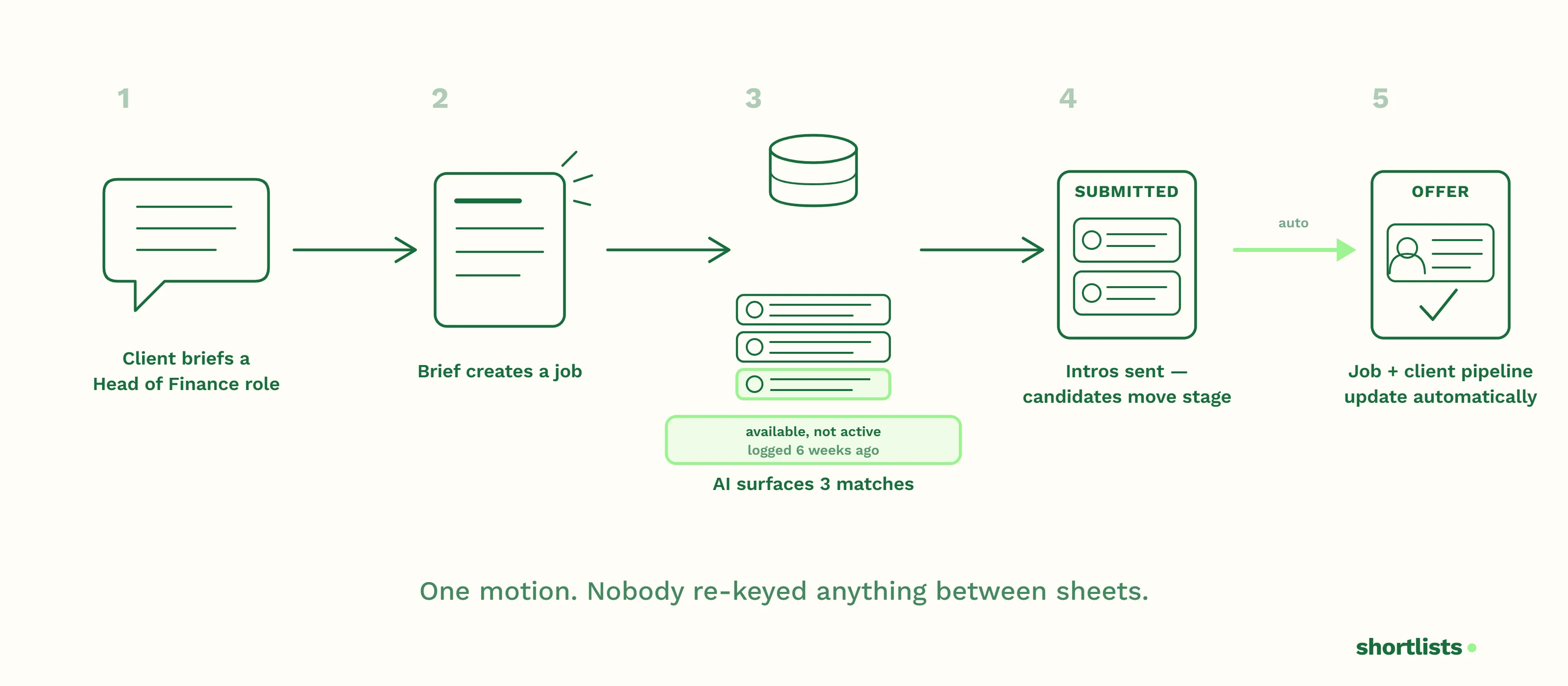
A client briefs you on a Head of Finance role. That brief creates a job. The platform's AI matching surfaces three matching candidates from your existing database, including one you logged as "available, not active" six weeks ago. You send the intros; those candidates move to "submitted," which updates the job stage automatically. The client moves the role to offer, and that progress shows on the client pipeline without you re-keying it anywhere. Three pipelines, one motion. Nobody copied anything between sheets, and nothing relied on you remembering the candidate from six weeks ago — the system did.
What "one place" actually means (and what it doesn't)
"One place" does not mean one screen showing everything at once. A wall of every client, candidate, and job you have would be unusable, and any vendor demoing that is showing off, not helping.
What it means is one source of truth. No record living in two systems where the two can drift apart. The candidate's stage is the candidate's stage, whether you're looking at it from the candidate pipeline or from the job. The practical test is simple: can you see exactly what's happening with a specific client, candidate, or job in under ten seconds, without switching tools or asking a colleague which version is current? If yes, you have one place. If you're reconciling two screens to be sure, you don't.
The features that make three-pipeline management work
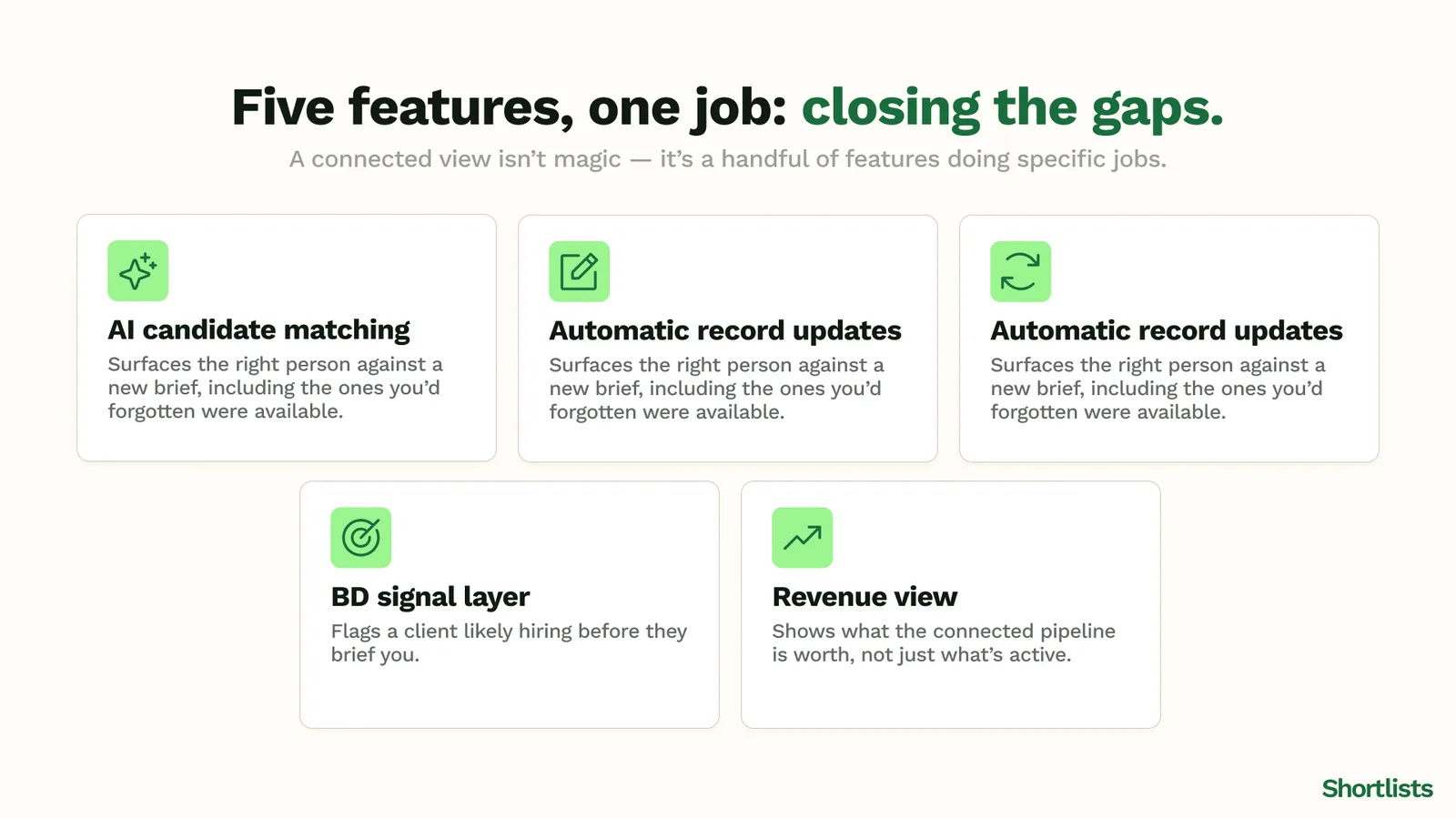
A connected view isn't magic; it's a handful of features doing specific jobs.
AI candidate matching surfaces the right candidate against a new brief without a manual database trawl — including the available-but-not-active people you'd otherwise forget. Automatic record updates mean notes from a call land on the record without you typing them, so the data stays current by default rather than by willpower. Pipeline stage automation moves a candidate or job forward when a step completes, so the picture reflects reality without manual housekeeping. A BD signal layer adds a fourth input — knowing a client is likely hiring before they brief you, covered in the BD Radar guide. And a revenue view shows what the connected pipeline is actually worth, not just what's active, so you can see the month coming.
The thread through all of these: each one removes a manual step that, left in place, makes you the connective tissue between three lists. Take enough of those steps out and the agency stops depending on what's in your head.
What breaks when you manage pipelines separately
It's worth being concrete about the failure modes, because they're so familiar they stop registering as problems.
The frankenstack version: candidate status in one sheet, the client brief in another, the job stage in a third, none of them linked. Every placement requires you to hold all three in sync manually, and the gaps are where candidates and briefs go quiet.
The two-tool version: an ATS for candidates and a separate CRM for clients. Better than spreadsheets, but there's still no single view of "which candidates are right for this brief today," because the candidate data and the client data live on opposite sides of an integration.
The real cost of both isn't the admin time, though that's real. It's the placements that don't happen — the matches never surfaced, the follow-ups never made, the warm candidate placed by someone whose system reminded them first.
Frequently asked questions
How does a recruiting CRM manage clients and candidates in one place?
It connects your three pipelines — clients, candidates, and live jobs — through a single data model. A client brief creates a job record; the job links to matched candidates; candidate progress updates the job stage automatically. Because no record lives in two places, the pipeline is always current without manual entry, and you get one source of truth rather than several lists to reconcile.
What is a candidate pipeline management tool for recruiters?
A candidate pipeline tool tracks each candidate's progress through the placement process — first contact, CV submission, interview, offer, placement — and connects that progress to the client brief and job it relates to. In a proper recruiting CRM it's one of three connected pipelines, not a standalone module, so a candidate's movement is always visible against the role they're being worked for.
What is the difference between a recruiting CRM and an ATS?
An ATS (applicant tracking system) manages candidates and applications. A CRM manages client relationships and BD activity. A modern recruiting CRM combines both: candidates and their pipeline stage are tracked alongside the client brief, the job, and your BD activity, in a single connected system rather than two tools joined by an integration.
How do recruitment platforms sync with Gmail and Outlook?
Most modern recruiting CRMs offer a Gmail or Outlook integration that logs emails against the relevant contact record automatically. Better platforms also sync calendar events and let you create candidate and client records straight from an email thread, which reduces the "I'll add this to the CRM later" problem that leaves records out of date.
What does a daily task list look like in a recruiting CRM?
A recruiting CRM task list surfaces your pending actions across all three pipelines: candidates due for follow-up, client briefs to progress, job stages to move on. The best ones generate tasks from pipeline rules, so if a candidate has sat at "CV sent" for five days with no client response, the system prompts you rather than waiting for you to notice.
How Shortlists approaches this
Shortlists is built around the three-pipeline model. Clients, candidates, and jobs are connected through the role, so a brief, its shortlist, and its value live in one pipeline view rather than three sheets. The AI surfaces matching candidates from your database automatically, including the people you'd otherwise forget were available, and BD Radar adds the hiring-signal layer so you can see a client coming before they brief you.
One source of truth, kept current without manual entry, at £79 per user per month with no annual contract required. The revenue dashboard shows what the connected pipeline is worth at a glance — no exporting needed. The aim is straightforward: make the connective work the system's job, not yours, so the agency stops running on what any one person happens to remember.
Next steps
Read: What Is a Recruiting CRM and Why Do Small UK Agencies Need One? — what a recruiting CRM actually does.
Read: What Features Should a 3-10 Person UK Recruitment Agency Look For in a CRM? — the features that make this work.
Read: BD Radar: How UK Recruiters Find Hiring Signals Before Jobs Are Posted — the fourth signal layer.
Explore: Switch to Shortlists — see the pipeline view for yourself.
Read: Growing a Small UK Recruitment Agency in 2026: The Founder's Guide — the broader growth context for why the connected view matters.
Compare: Shortlists vs Bullhorn
Compare: Shortlists vs Vincere
Compare: Shortlists vs Loxo